

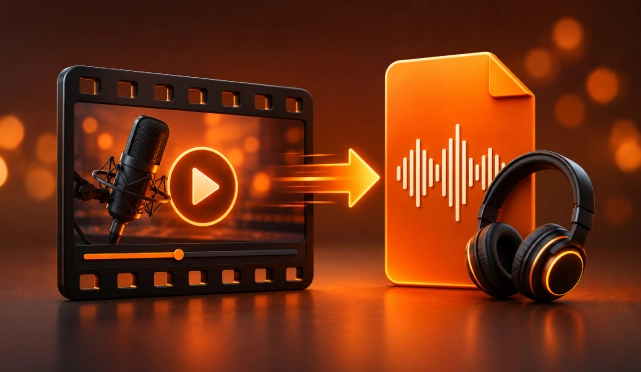

You know what you’re looking for. You want to get a chunk of that video part and extract audio from it. Ideally without downloading three different apps, creating an account, or sitting through a process that takes longer than the video itself.
Chances are you have tried this before. But unfortunately landed on a converter that buried the download button under three layers of advertisements, hit a file size limit right at the finish line, or simply never found a tool worth sticking with in the first place.
If this sounds familiar, you are in the right place. This blog is going to get you to extract audio from video faster than you can think.
How to Extract Audio from Video Without Waiting?
Now the problem is that most platforms do not make this easy. Most of the time video is always there, but the audio is somehow always locked inside it. The gap between those two things has historically been more complicated than it should have been.
The older ways of extracting audio from video are slow, complicated, and frankly not worth the effort. The traditional route involved downloading dedicated software, navigating an interface that looked outdated, waiting through a conversion process that felt disproportionately long, or ending up with a file in a format you did not ask for.
If you have tried to extract audio from a video before and given up halfway through, the process was probably the problem rather than your patience.
The gap is basically what the right tool is designed to close.
How ReHear Extracts Audio from Video Fast?
ReHear audio extraction tool is designed around the reality of how people consume content, especially when they are on the move. What separates ReHear from the generic converter is the attention paid to output quality. Extracting audio is only useful if the audio that comes out sounds the way it should. This is how fast you can extract your audio from video:
1. Sign Up & Pick a Plan: Create your account and start with a free trial of 7 days after picking up a plan.
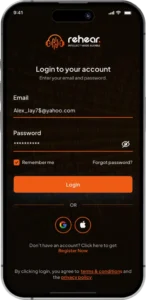

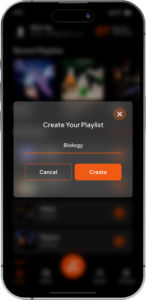
2. Build Your Playlist & Upload: Set up playlists by uploading files. You can choose up to 20 files from your library or gallery.
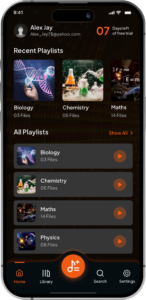
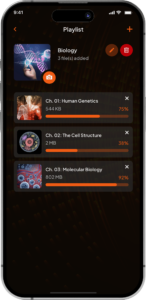
3. Convert & Preview: Conversion starts instantly. Just make sure to review your audio before moving forward. You can even cut out the unwanted parts.
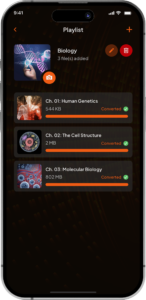
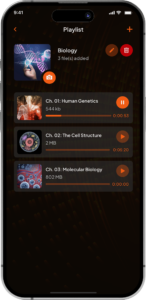
It is simple as that. You’re done in under a minute. This is how simple it is to make an audio from your video.
The Advantages That Make ReHear Worth It
ReHear preserves the original audio quality of the source file rather than running it through a compression process that trades fidelity for speed. What you put in comes back out sounding clean, clear, and exactly the same.
Features
- Accurate transcription with support for multiple languages
- Extract audio from video within literal seconds
- Make articles, summaries, blog posts, or personal notes out from transcripts
- Built-in audio editor that lets you trim unrequired sections, merge clips, and bookmark moments worth returning to
- Smart search across audio files, transcripts, and playlists lets you find an exact quote or topic
- Flexible playlist management with the ability to shuffle, reorder, rename, and combine clips however you need them
- Batch processing handles multiple videos at once, so you are not converting files one by one.
Pros
- Generous free plan that covers basic conversions and organization without asking for a card upfront.
- Strong organization with tagging, categorizing, and effortless reordering features that keep your library manageable as it grows.
- Convert raw audio content into polished written outputs without needing a separate app for the job.
- Multi-language transcription removes the language barrier for international content.
- Instant audio search saves hours that would otherwise be spent manually scrubbing through files.
Cons
- Non-unlimited usage, advanced tagging, and flexible export formats require a paid subscription.
How is ReHear Better than Online Audio Conversion Tools?
Most online audio conversion tools are based on one action and ends at download. ReHear is the starting point where content becomes useful. Many tools do one job and leave the rest up to you. You extract audio, then move to another app for transcripts. You copy text into a document, organize files somewhere else, and waste time searching through folders later.
ReHear keeps everything in one place.
- You upload a video. Upon uploading you can experience many added- features which are more than just extracting audio. You can generate a transcript, edit your files, organize your library, and search through everything without switching apps.
- The audio stays high quality because ReHear does not compress your files. The transcript feature supports multiple languages and delivers accurate text you can use right away.
- You can create notes, summaries, or articles directly from your transcripts. Want to trim audio, merge files, or save important moments? Use the built-in editor without leaving the platform.
- When your library grows, Smart Search helps you find specific quotes, topics, or moments in seconds. You can also process up to 20 videos at once, saving hours of repetitive work.
Everything lives in one place, helping you spend less time searching and more time listening, learning, and creating.
In Conclusion
Stop spending time watching videos that have been sitting open in a browser tab for weeks, buried in an email, or saved in a folder you’ll probably never revisit. If your goal is to learn something, then staying tied to the video format will only create unnecessary friction. ReHear is built to replace the struggle of stitching together three or four different tools just to get from a video file to a usable transcript. It is a well-rounded option for anyone who wants to do more than just extract audio. You can purchase paid plans for workflows that demand unlimited usage, advanced tagging, or flexible export formats.